EV EduVlaanderen

For school teams that want time back

One school platform for teaching, follow-up and communication.

EduVlaanderen brings scheduling, attendance, reports, parent communication and mobile apps together in one calm workspace for primary and secondary education.

1 platformscheduling, reports, parent contact and staff workflow in one place
3 viewsteachers, parents and students each get their own portal
Less frictionfewer separate tools, less duplicate work, fewer misunderstandings

Why this has to change

Where schools lose time and trust today.

Not because teams do not know their job, but because the software too often gets in the way. You feel that in communication, follow-up and every school day that runs harder than it should.

01 / 06

Slow and cumbersome

Teachers move through too many separate screens for tasks that should be one smooth flow. That costs time in the classroom, in staff work and during reporting periods.

02 / 06

Message overload for parents

Push at 10pm on Sunday. Five duplicates about the same field trip. No distinction between urgent and routine. Parents stop reading — and miss what actually matters.

03 / 06

Reports not linked to learning outcomes

Grades sit detached from what the inspection actually checks. During audits, schools manually reconstruct which outcomes were tied to which assignment.

04 / 06

No usable schedule

Substitutions communicated by separate email. Cancelled lessons visible only after the student arrives home. The schedule is a PDF nobody can read on their phone.

05 / 06

Unclear data sovereignty

Where is your students' data? Which subcontractor sees it? Processor agreements are vague. GDPR debates resurface at every parent council meeting.

06 / 06

Vendor lock-in without negotiating power

One supplier, one-sided price increases, no exit path. Flemish schools had no alternative — until now.

What the platform does

Eight core functions, one login.

No separate modules, no separate contracts. One platform that genuinely supports the work of teachers, principals and parents.

SCHEDULE

Real weekly schedule with substitutions

Rooms, teachers, classes, absences. Parents and students see changes immediately on their phone. PDF export for staff-room boards.

ATTENDANCE

Attendance + AgODi loket

Half-day granularity, doctor's note workflow, automatic export to the Flemish education ministry's official XML format. No manual data entry.

CURRICULUM

Flemish learning outcomes built in

Full corpus for KOV, GO!, OVSG, POV (the four educational umbrella organisations). Assignments link to official outcome codes. Inspection reports in one click.

COMPETENCIES

Competency levels per student

Six levels from "to begin" to "fluent". Recency-weighted from the last evidence points — a measurable basis for reports.

REPORTS

Report publication with AI assistant

Period-by-period generation, linked to evidence. AI sentence suggestions via self-hosted Mistral-7B. Teacher approves or edits.

PARENT APP

Three native apps + web

Parents, teachers and students each get their own iOS/Android app. Web portal for administration. One login, three perspectives.

COMMUNICATION

Messaging without parent overload

Work-hours policy, urgency budget, quiet hours, automatic translation into 8 languages. Messages people actually read.

PRINCIPAL

Promotion engine + heatmaps

End-of-year run that promotes each class to the next. Class-attendance heatmap for pedagogical follow-up.

What it looks like

Seven real screens from the platform.

No wireframes, no placeholders. These are screens from the actual web and mobile experience schools use.

01 · UI

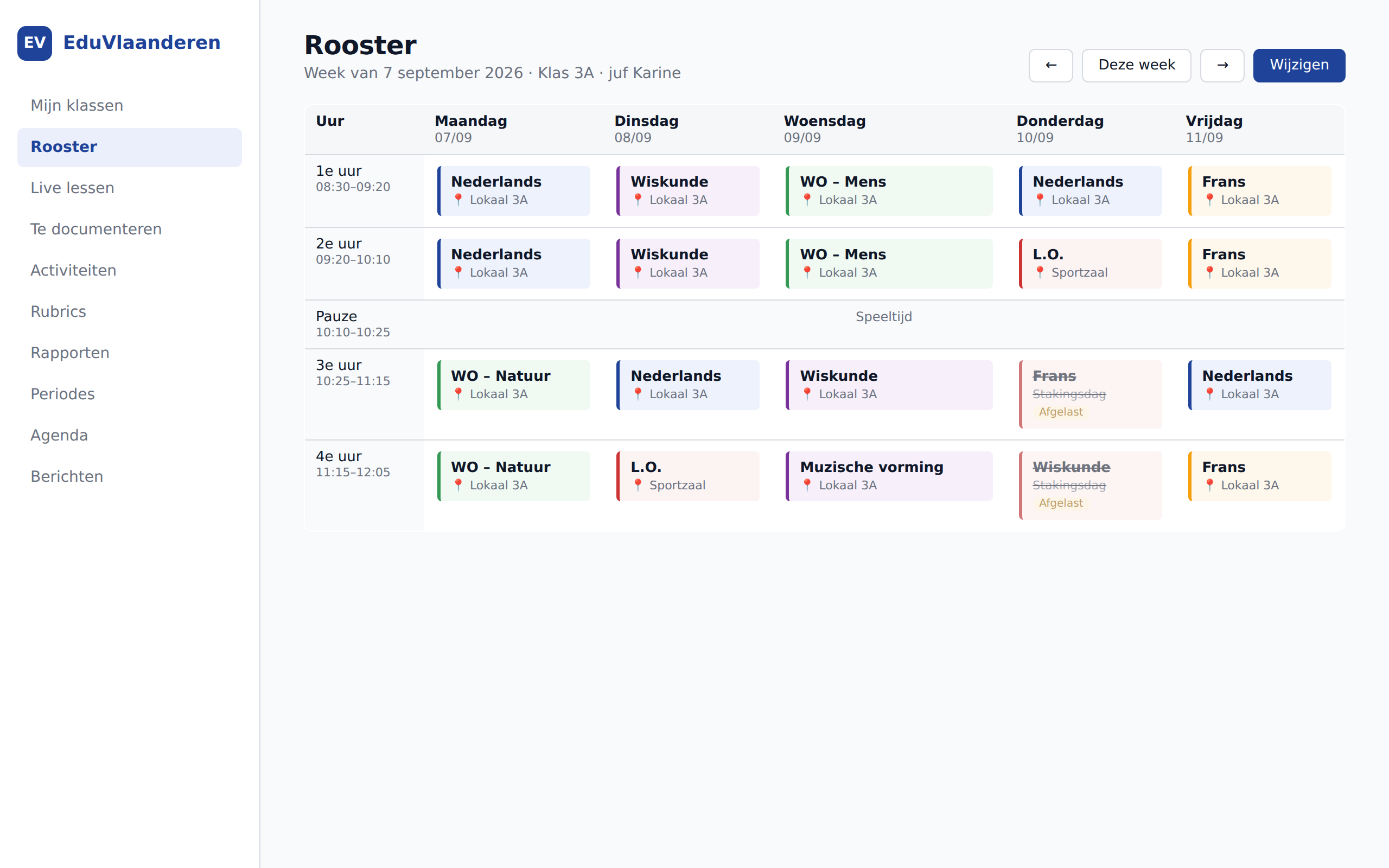
Weekly schedule — class 3A

One view, three perspectives (class, teacher, student). Cancelled lessons and rooms visible immediately.

Weekly schedule — class 3A
02 · UI

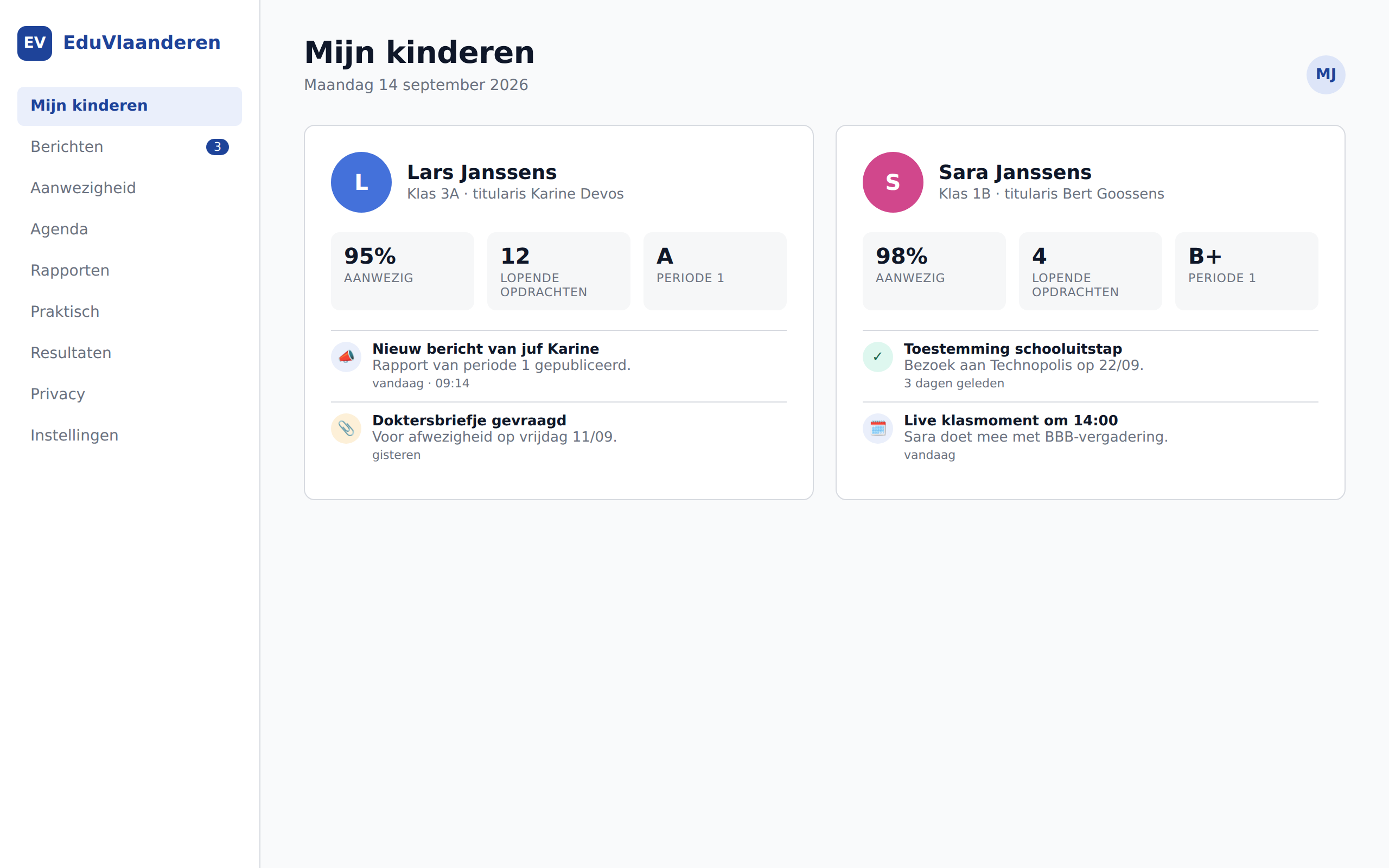
Parent portal

All children, one login. Attendance, assignments, report status per child.

Parent portal
03 · UI

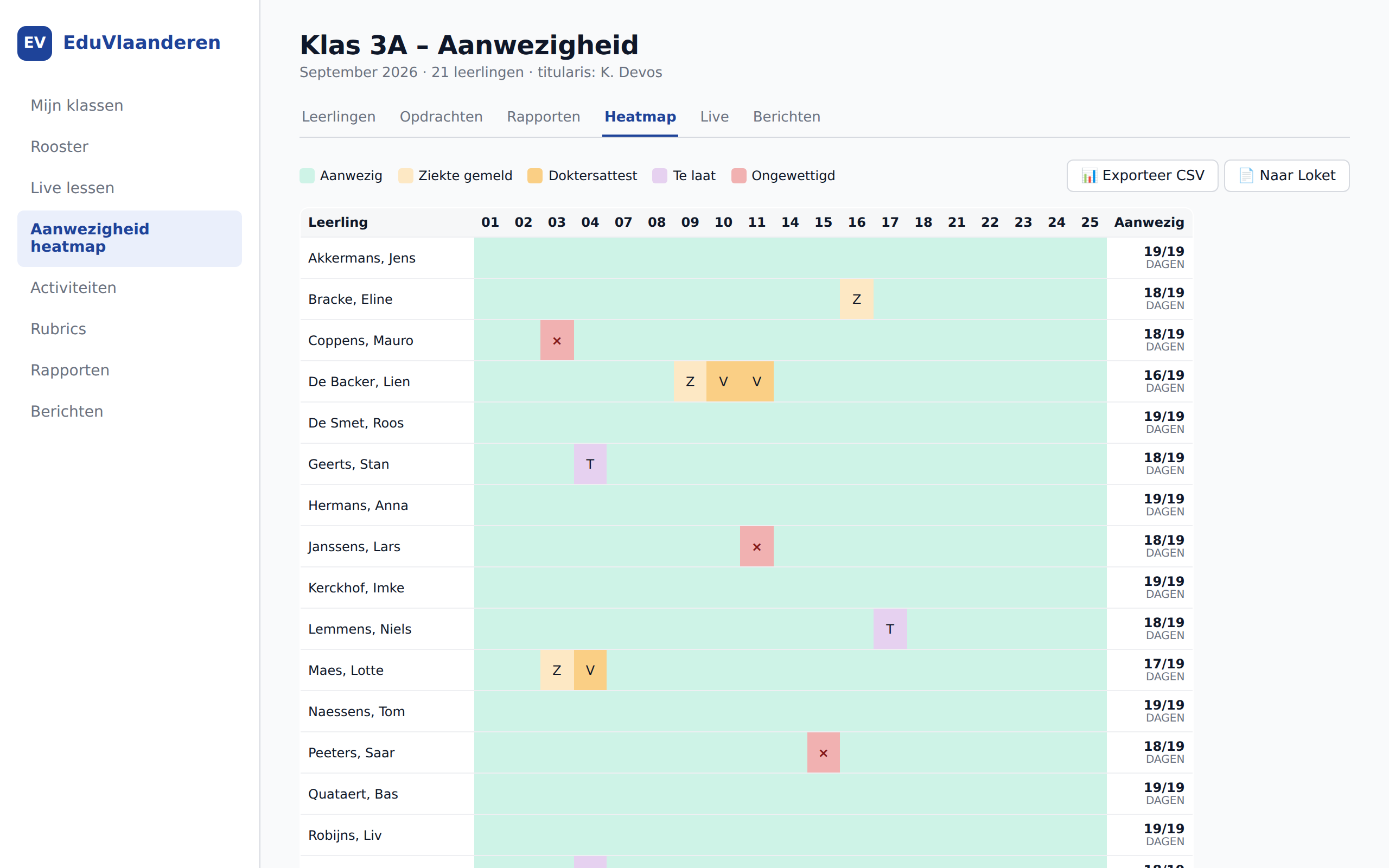
Attendance heatmap

21 students × 19 school days. One-click export for the AgODi ministry portal.

Attendance heatmap
04 · UI

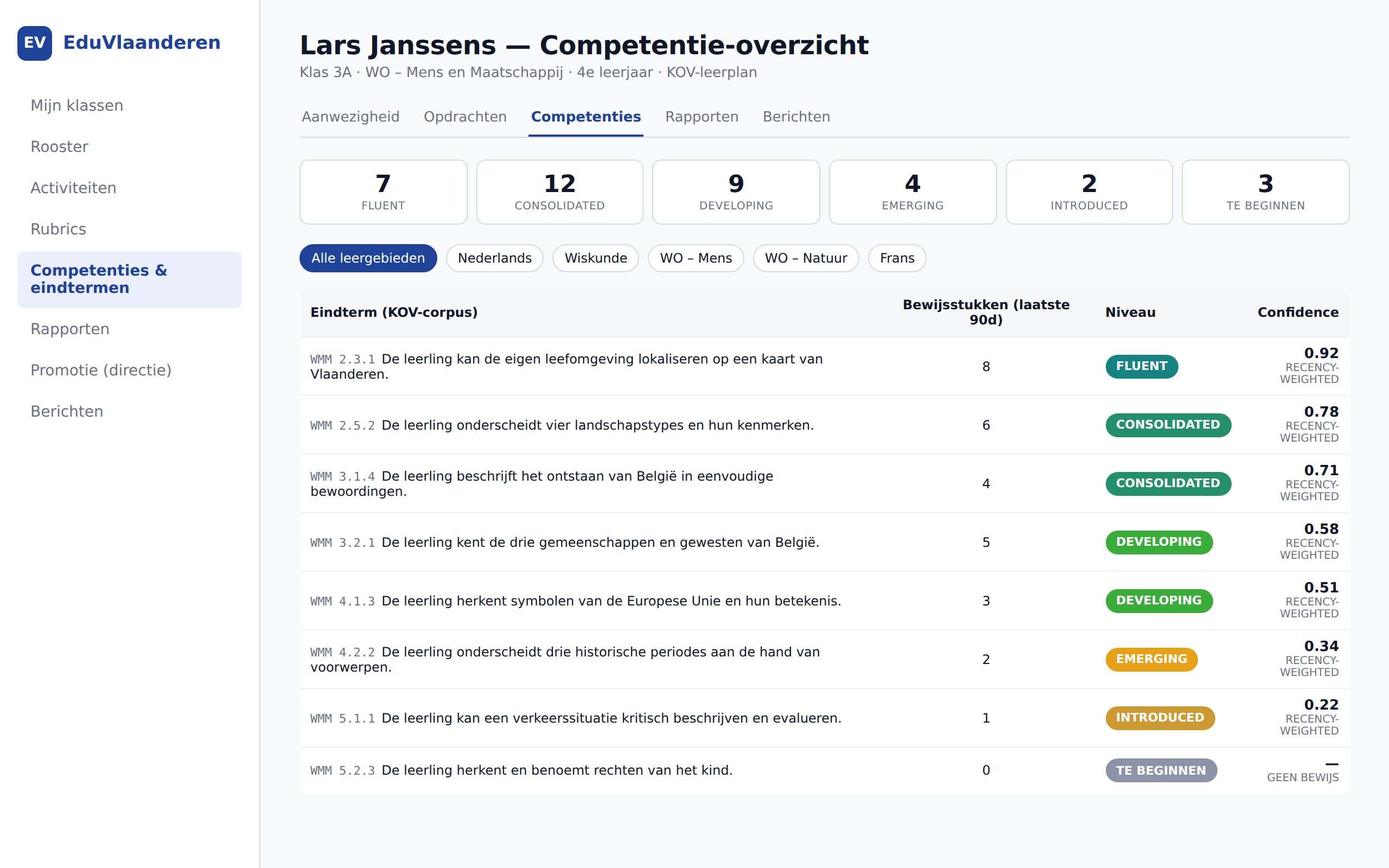
Competency tracking

Per student: 38 outcomes tracked, with confidence score and evidence from the last 90 days.

Competency tracking
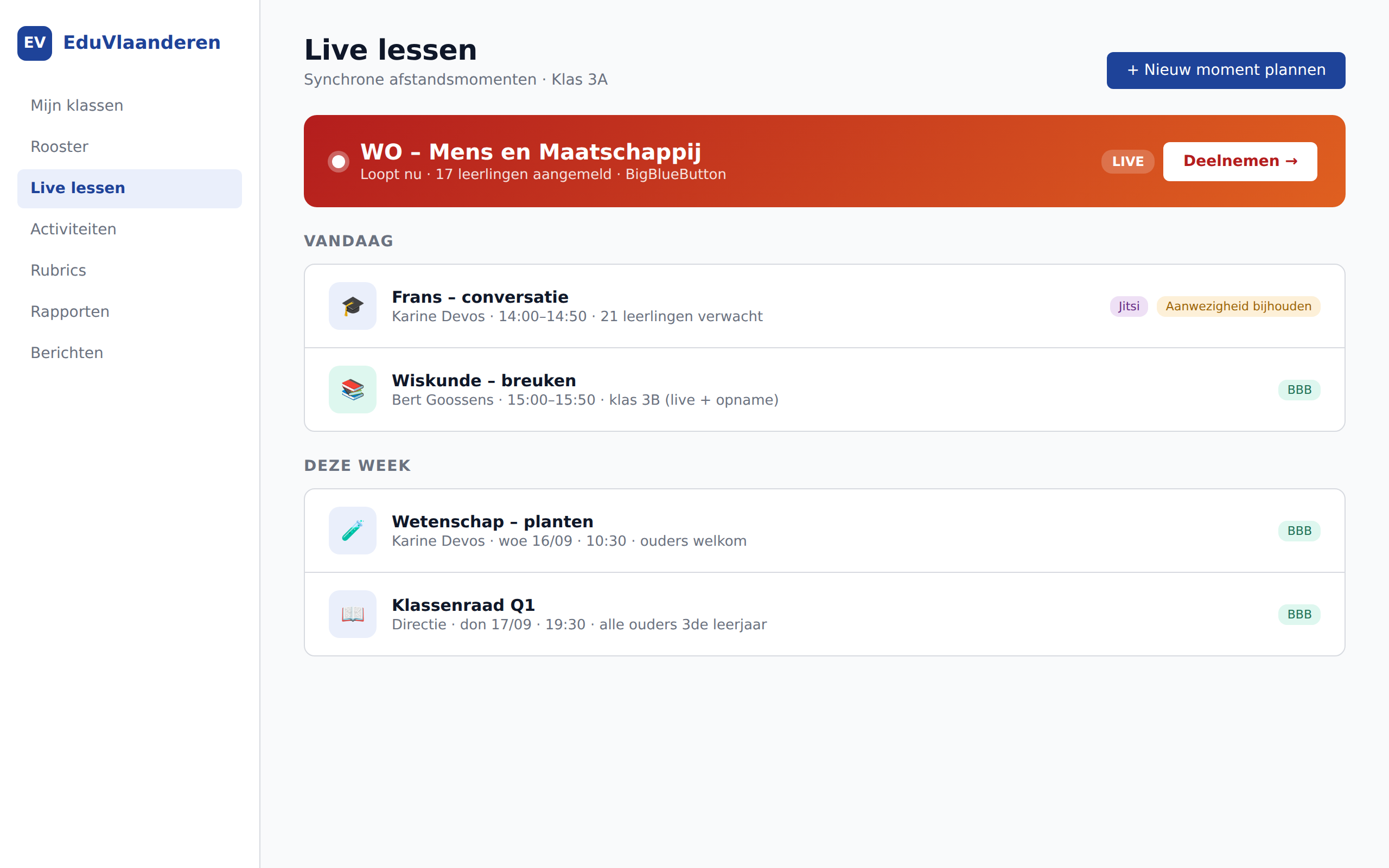
05 · UI

Live class sessions

BigBlueButton + Jitsi integrated. Attendance recorded automatically during online lessons.

Live class sessions
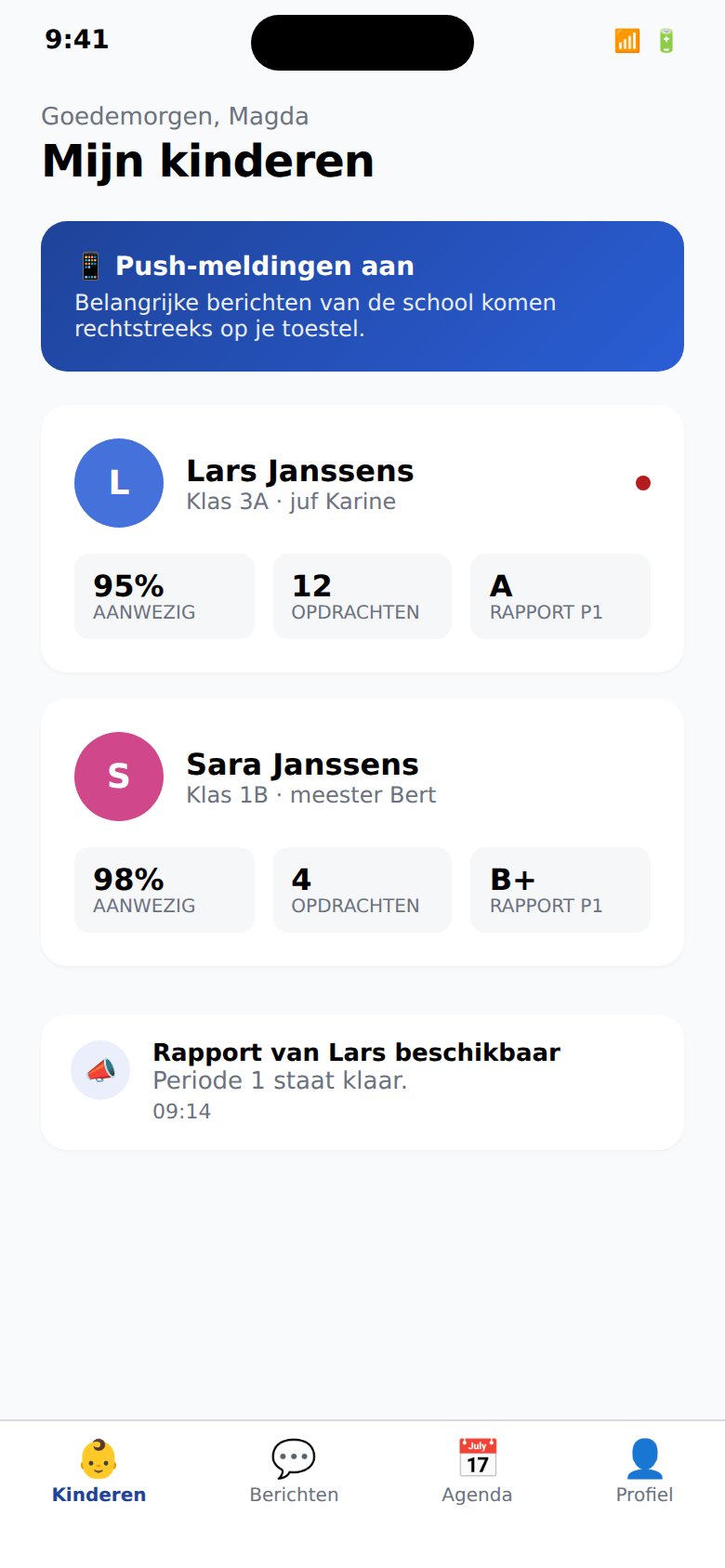
06 · UI

Parent app

Messages, absences and day-to-day follow-up on mobile, without noise.

Parent app
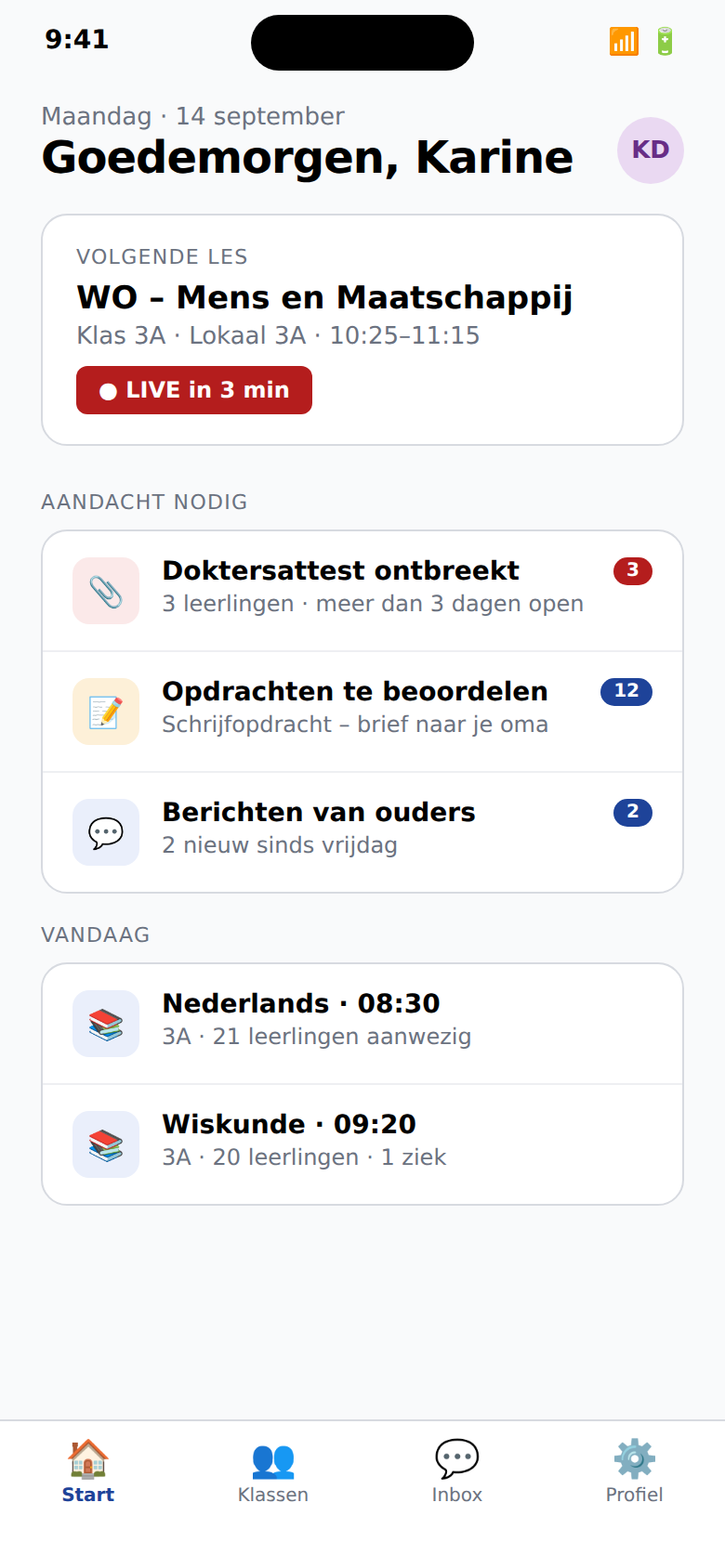
07 · UI

Teacher app

A fast mobile entry point for attendance, messaging and today's class work.

Teacher app

Why EduVlaanderen

A business case that also works on the school floor.

A school platform should do more than look modern. It should reduce admin, improve parent communication and be simpler to roll out for the whole team.

01

Less admin in every school day

Scheduling, attendance, reports and communication live together. Teams spend less time re-entering data, switching modules and hunting for context.

02

Calmer parent communication

Parents see only what matters to them, in a clear per-child flow. That reduces overload and increases the chance that important messages are actually read.

03

Faster rollout without months of chaos

Pilots can start from a recognisable web experience and mobile apps that match the real work of teachers, administration and parent follow-up.

04

Predictable cost, clear exit path

Schools get a modern platform without locking themselves in for years. Pricing stays understandable and data export remains available if priorities change.

For every Flemish school

Not just the average — also OKAN, method schools, care.

Smartschool was designed for the "standard" school. We are not. EduVlaanderen has modules that take the second half of Flemish education seriously: newcomer language learners, method schools, students with care needs, and a real internal workspace for the school team.

WELZIJN

Welfare module with 3-tier care model

Broad base care, increased care, extended care. Student dossier with confidentiality levels (team / care team / CLB only). Federation with CLB via explicit shares. Crisis flows built in for the care coordinator.

View the module →
OKAN

OKAN mode for newcomer language learners

Intake flow with home language and prior education. CEFR progression across 4 skills (listening/speaking/reading/writing, A0 → B2). Decretal transition-readiness check (12 months + minimum A2). Parent communication automatically translated to home language.

View the module →
METHODE

Freinet, Dalton, Steiner, Jenaplan

One toggle in the director settings. Narrative reports instead of grades (Freinet/Steiner/Jenaplan). Task letter flow for Dalton. Period education for Steiner. Stamgroep for Jenaplan. Hybrid with regular is also possible.

View the module →
STUDIUS

AI tutor that does not give answers

Refusal model for students: asks Socratic questions, escalates after 3 misuse attempts to the teacher. Safety layer (self-harm/abuse) escalates directly to care coordinator. No Studius for kindergarten — pre-literate age.

View the module →
LERARIUS

AI copilot with 6 capabilities

Report phrases, eindterm tagging, class issue analysis (attendance+competency+activities), parent thread summary, differentiation suggestions, lesson plan draft. Source-grounded: every suggestion shows the data the AI used. The teacher always decides.

View the module →
SCHOOLWERKING

Replace Intradesk with something workable

Internal workspace for the team: documents, meetings with agenda + minutes, ACL per person or per role, calendar visible to all staff by default. Flat structure, no folder spaghetti, search-first.

View the module →
ACCESSIBILITY

Real UDL component library

OpenDyslexic toggle, reading ruler, Pomodoro focus timer (ADHD), color overlays (Irlen), visual schedule (ASD), chunked text for cognitive load. Not "accessibility is opt-in afterthought" — built into every page.

View the module →
MIGRATION

5-phase Smartschool migration with reverse button

Discovery → shadow mode (running parallel) → pilot per class → module switchover → decommission. At any time 1-click export to Smartschool bulk import format. No vendor lock-in, not with us, not with Smartschool.

View the module →

How it works

Seven new modules, in detail.

Not a marketing summary — the actual mechanics, the pedagogical reasoning, and what a teacher or care coordinator sees on screen. What's described here is in the code you receive.

WELFARE

Three care tiers, one dossier, CLB federation

The Flemish care continuum is not marketing speak — it is established in education law. EduVlaanderen follows the continuum strictly: broad base care (tier 1) is implicit, increased care (tier 2) and extended care (tier 3) have a structured dossier with actions, follow-ups, and CLB federation.

What breaks today

In Smartschool, "care" is spread across notes, messages, and Word files on the shared drive. Nobody knows what information whom may see. CLB workers receive emails with PDF attachments — a GDPR nightmare.

How EduVlaanderen fixes it

One dossier per student, with explicit confidentiality levels: team-visible, care-team-visible, or CLB-only (federated, only via explicit share). Actions are recorded chronologically, with type (observation, intervention, meeting, referral, note) and optional follow-up date.

Care coordinator workflow

  1. 1. Class teacher flags a student — opens an increased-care dossier (tier 2).
  2. 2. First action: observation (behaviour, schoolwork, social interaction).
  3. 3. MDO decides on external support — escalation to tier 3 (confidentiality auto-narrows to care-team-only).
  4. 4. CLB worker receives explicit share grant — can now read + write that one dossier.
  5. 5. Monthly follow-up via scheduled action nudges.
  6. 6. Close dossier with closing note once student fits back in tier 1 (base care).

Why it works this way

The care continuum requires gradation of interventions and of privacy. A class teacher must be able to see a student gets extra support, but not necessarily the family-context details that the CLB worker discusses. By storing confidentiality as a first-class attribute in each dossier, we avoid the "all or nothing" culture that pushes schools toward informal email.

OKAN

Reception education with CEFR progression

OKAN students (Newcomer Language Learners) follow a separate track — minimum 1 year, with explicit transition-readiness criteria. EduVlaanderen follows the decretal rules exactly and gives the OKAN teacher a working tool instead of a spreadsheet.

What breaks today

Smartschool has no OKAN module. Schools track CEFR levels in Excel, transition moments in a Word document, and parent communication happens via Google Translate copy-paste by the teacher.

How EduVlaanderen fixes it

One intake flow records home language, country of origin, prior education, and literacy. Progress is recorded periodically across four skills (listening / speaking / reading / writing), CEFR-aligned (A0 → B2). A readiness engine determines if the student is ready for transition per decretal rules (≥ 12 months + minimum A2 across all 4).

OKAN teacher workflow

  1. 1. New student: intake form — home language required, rest optional.
  2. 2. Platform auto-generates first A0 checkpoint and expected transition date (1 year later).
  3. 3. Every 6-8 weeks: progress checkpoint with the 4 CEFR levels.
  4. 4. After 12 months: readiness engine marks eligibility (green) or gives reason (red).
  5. 5. On green: care coordinator/director can register transition to regular class.
  6. 6. Parent messages auto-translated to home language (LibreTranslate, EU-sovereign).

Why CEFR and not "fluent Dutch"

CEFR (European Reference Framework) is not edu-jargon — it is the framework the OKAN teacher uses in training and that connects to the parents' integration track. By tracking 4 skills separately we get a fairer picture: a student can present fluently orally (B1) while writing still sits at A2. The readiness rule "all 4 ≥ A2" prevents premature transition.

METHOD SCHOOLS

One toggle, a full pedagogy stack

Freinet, Dalton, Steiner and Jenaplan are not edge cases — together they represent hundreds of Flemish schools that Smartschool consistently treats as deviation. EduVlaanderen has a built-in mode per method, with correct out-of-the-box defaults.

What breaks today

A Freinet school wanting narrative reports in Smartschool must rewrite templates manually every term. A Dalton school wanting task letters imports Excel files. A Steiner school is forced to use grades it pedagogically rejects.

How EduVlaanderen fixes it

One dropdown in director settings enables the method, with preset defaults overriding most pedagogical choices: narrative report for Freinet/Steiner/Jenaplan, task letter for Dalton, period-education blocks for Steiner. Feature flags remain adjustable — a hybrid school combines.

Configuration per method

  1. Freinet → uses_grades=false, narrative report, circle minutes enabled, free-text module.
  2. Dalton → task-letter flow per 2 weeks, freedom-in-bound dashboard for students.
  3. Steiner → period-education blocks (4 weeks), handwritten-style report option, year-rhythm calendar.
  4. Jenaplan → stamgroep structure, block periods (speaking/playing/working/celebrating), celebration calendar.
  5. Hybrid → manual selection of features from each method (for blended schools).
  6. Regular → standard grades + competencies, classical report periods.

Method schools deserve no workaround

A platform treating method schools as "regular school with cosmetic changes" misunderstands the pedagogical project. A narrative report is not "the same report without grades" — it is a fundamentally different evaluation philosophy where the growth of the child matters more than position on a scale. By bringing method-config to the heart of report generation, Freinet and Steiner teachers can truly follow their pedagogy.

STUDIUS

An AI tutor that doesn't say the answer

Turning ChatGPT loose on homework teaches students nothing but copy-paste. Studius is built on the opposite principle: refusal is the core competency. The AI asks Socratic questions, suggests strategies, references earlier material — but never gives the final answer.

What breaks today

Students using ChatGPT to solve math exercises pass exams until they sit in a test room. Teachers cannot detect this, and the education system has no alternative that respects their pedagogical role.

How EduVlaanderen fixes it

Studius runs locally (Ollama, EU-sovereign) with a system prompt that explicitly forbids final answers. A post-filter detects accidentally leaked answers and rewrites the output to a Socratic question. Three times pressing for the answer auto-escalates the conversation to the class teacher.

Safety layers

  1. Pre-filter: scan message for self-harm or abuse signals (NL+EN patterns). Match → direct supportive answer with 1813/1712 helplines, escalation to care coordinator.
  2. Misuse detection: count "give me the answer" attempts. At 3 → lock conversation + notify class teacher.
  3. System prompt per age band: kindergarten blocked, lower (6-12) gets short sentences and max 3 sentences per answer, secondary gets full Socratic explanation.
  4. Post-filter: regex check on "the answer is", "= [number]", "the solution is". Match → rewrite to Socratic fallback.
  5. Audit log: every turn with refusal-reason + safety-flag in a tenant-scoped table. Care coordinator can inspect any escalated conversation.

Refusal as pedagogy

A good teacher rarely answers a student question directly — the first reaction is almost always a counter-question: what have you tried? what do you know about this? which step would you take first? Studius is not Socrates cosplay; it is an AI explicitly trained to imitate that teacher reflex. The difference with ChatGPT is fundamental: ChatGPT optimises for "helpfulness", Studius for "learning yield".

LERARIUS

AI copilot, designed for teacher work

Lerarius is not a ChatGPT wrapper — it is a collection of concrete teacher tasks, each with structured input and source-grounding: every suggestion shows the exact data the AI used, so the teacher can audit the output.

What breaks today

Generic AIs ask you to write a paragraph, hope you provide enough context, and produce report phrases that sound plausible but are factually wrong. The teacher doesn't know on what data the AI based its claim.

How EduVlaanderen fixes it

Six capabilities with structured input: report phrases (per student + period), eindterm tagging (on an activity), class issue analysis (per class with time window), parent thread summary (per thread), differentiation suggestions (per assignment with class distribution), lesson plan draft (per eindterm codes + duration). Every response logs the source data in a JSONB `sources` array.

Source-grounded workflow

  1. Teacher picks capability + context (class ID, assignment ID, student ID, etc.).
  2. Backend collects structured data: e.g. for class-issue → attendance last 14 days, competency distribution, open assignments.
  3. Data sent to Ollama with a Lerarius-specific prompt that explicitly says: "use only these facts, no made-up names or numbers".
  4. Response stored with `sources` JSONB array — what the AI "saw".
  5. Teacher sees the output beside an expandable "Sources" section and can compare before accepting or editing.
  6. On accept/edit: persisted in lerarius_response.teacher_edit — feedback for future fine-tuning.

Source-grounding as professional duty

A teacher writing a report phrase about a student is professionally accountable for what it says. A report phrase from an AI without source citation cannot be professionally endorsed. By linking every Lerarius response to its source data, the teacher remains the final authority — the AI does only the typing work, not the judgement.

STAFF WORKSPACE

Intradesk, finally workable

Every school team needs a workspace that is neither the messaging module nor Google Drive. Schoolwerking is that — flat structure with categories instead of folders, ACL per person or per role, and search-first navigation.

What breaks today

Intradesk is a disappointing UX from 2008 with nested folders no one can navigate. The alternative — Google Drive — splits the school into two data worlds, with privacy implications and no integration with the rest of the platform.

How EduVlaanderen fixes it

A flat list of documents + meetings, categorised (policy / procedure / minutes / note / calendar / other), searchable in title and content. ACL is per-document or per-meeting, with principal = person or role ("all teachers"). Calendar category automatically readable for all staff. Director sees everything.

Access rules

  1. Director → owner scope on everything in the school, no ACL needed.
  2. Author → owner scope on own documents + meetings.
  3. Calendar category → automatically read for all staff roles (no secret calendar).
  4. Explicit ACL → grant per person ("this person may read") or per role ("all class teachers may write").
  5. No ACL match → no access (default deny, except director/author/calendar).
  6. Archive document (owner only) — removed from search results, not deleted.

Flat structure wins over folders

Folder structures come from a world where storage was expensive and search was slow. A school team has neither — storage is free and search is instant. A flat structure with categories + tags + full-text search finds a document faster than anyone can click through a folder hierarchy. Bonus: new staff don't need to learn folder conventions.

ACCESSIBILITY

UDL components built in, not as plugin

Universal Design for Learning is not "an accessibility button in the corner" — it is a design principle saying every student deserves an interface that works for them. EduVlaanderen has a component library with 7 aids, available on every page.

What breaks today

Accessibility in Flemish edtech usually means: a dark mode and larger fonts. For students with dyslexia, ADHD, ASD, dyscalculia or dyspraxia, that's insufficient. Aids are often sold as separate apps that don't integrate with the platform.

How EduVlaanderen fixes it

An accessibility toolbar (♿ button bottom-left) opens a panel with 7 aids. Students themselves choose what's on — preferences persist, including in the mobile app.

The 7 components

  1. OpenDyslexic toggle → switches system font to dyslexia-friendly.
  2. Text size → A / A+ / A++ (proportionally larger).
  3. Background colour (Irlen) → cream, blue, green, pink tint — reduces visual stress.
  4. Reading ruler → horizontal tinted band following cursor — helps line tracking for dyslexia.
  5. Focus timer → Pomodoro (5/10/15/25 min) with progress ring — ADHD focus aid.
  6. Reduce motion → respects prefers-reduced-motion automatically, also manual.
  7. Visual schedule (ASD) → pictogram + label strip with current activity marked.

Not one accessibility, but many

Dyslexia, ADHD and ASD have contradictory needs. What helps a student with dyslexia (OpenDyslexic font, colour overlay) can distract a student with ADHD. What gives an ASD student structure (visual schedule, repeating routine) can cognitively overload a student with dyscalculia. The answer is not an "accessibility mode" but individual control — each student configures what works for them.

AI assistant for teachers

Four AI features — opt-in, EU-sovereign, no US cloud.

We use self-hosted open-source models on our own Hetzner servers in Germany. No Anthropic, no OpenAI, no Google. Each school decides whether to enable AI features.

All inference runs on Hetzner Germany. No data leaves the EU. Audit logs for GDPR Article 22 compliance on every report suggestion.
WITH EVERY REPORT

Report sentence assistant

Mistral-7B suggests report sentences based on competency scores and attendance. Student name never appears in the prompt. Teacher approves or edits.

WITH EVERY MESSAGE

Messages in 8 languages

Parents receive messages in Dutch plus their own language: FR, EN, DE, AR, TR, PL, RO, UK. Translation via self-hosted LibreTranslate with tenant-scoped cache.

WITH EVERY ASSIGNMENT

Curriculum auto-tagging

You describe the assignment, the system suggests learning outcomes from your umbrella's corpus — via pgvector semantic search on nomic-embed-text vectors.

WEEKLY PER CLASS

Early absenteeism detection

Four pure-statistics detectors: weekday residual, 10-day cluster, two-proportion z-test trend, consecutive unjustified. No LLM — auditable and explainable.

Parent app
Teacher app

Mobile

Three native apps for three roles.

Not one app with three tabs. Three separate apps, each optimised for its user. iOS and Android, built with React Native (Expo).

  • Push notifications that respect quiet hours
  • Offline reading for reports and messages
  • Biometric login (FaceID / fingerprint)
  • Consent toggle per channel, per child
  • Under 12: no direct student-teacher DMs
iOS (App Store) Android (Google Play)

Pricing

Three tiers. All SaaS, all on Hetzner.

No hidden fees, no annual contracts with auto-renewal. Monthly invoicing, cancellable per trimester.

Pilot

€4.50

per student per year — first school year at half price

  • Full functionality
  • Hetzner hosting (Germany)
  • Onboarding + Smartschool import
  • One-click exit at no cost
  • Email support
Become a pilot school

Plus

€12

for umbrellas >5 schools or >1500 students

  • Everything in Standard
  • 24/7 incident response
  • Custom integrations (SAP, Wisa)
  • Monthly roadmap call
  • Dedicated account manager
Request umbrella conversation

Concrete example: a primary school of 350 students pays €3,150 per year after the pilot. Smartschool today costs between €5,250 and €10,500 for the same school.

Ready to talk?

One pilot school per region, first school year at half price. We show the platform with your real school context — your classes, your periods, your learning outcomes.

Request a demo