Wisa
Students, classes and school-year structures through controlled import/export and shadow comparison.
School platform · Belgium & Europe
Learovia brings scheduling, attendance, reports, parent communication and mobile apps together in one calm workspace for primary and secondary education.
Why this has to change
Not because teams do not know their job, but because the software too often gets in the way. You feel that in communication, follow-up and every school day that runs harder than it should.
Teachers move through too many separate screens for tasks that should be one smooth flow. That costs time in the classroom, in staff work and during reporting periods.
Push at 10pm on Sunday. Five duplicates about the same field trip. No distinction between urgent and routine. Parents stop reading — and miss what actually matters.
Grades sit detached from what the inspection actually checks. During audits, schools manually reconstruct which outcomes were tied to which assignment.
Substitutions communicated by separate email. Cancelled lessons visible only after the student arrives home. The schedule is a PDF nobody can read on their phone.
Where is your students' data? Which subcontractor sees it? Processor agreements are vague. GDPR debates resurface at every parent council meeting.
One supplier, one-sided price increases and no practical exit path. Schools deserve a credible alternative with verified imports and complete exports.
What the platform does
From first attendance to a published report, teachers, leadership, parents and students keep working in the same context.
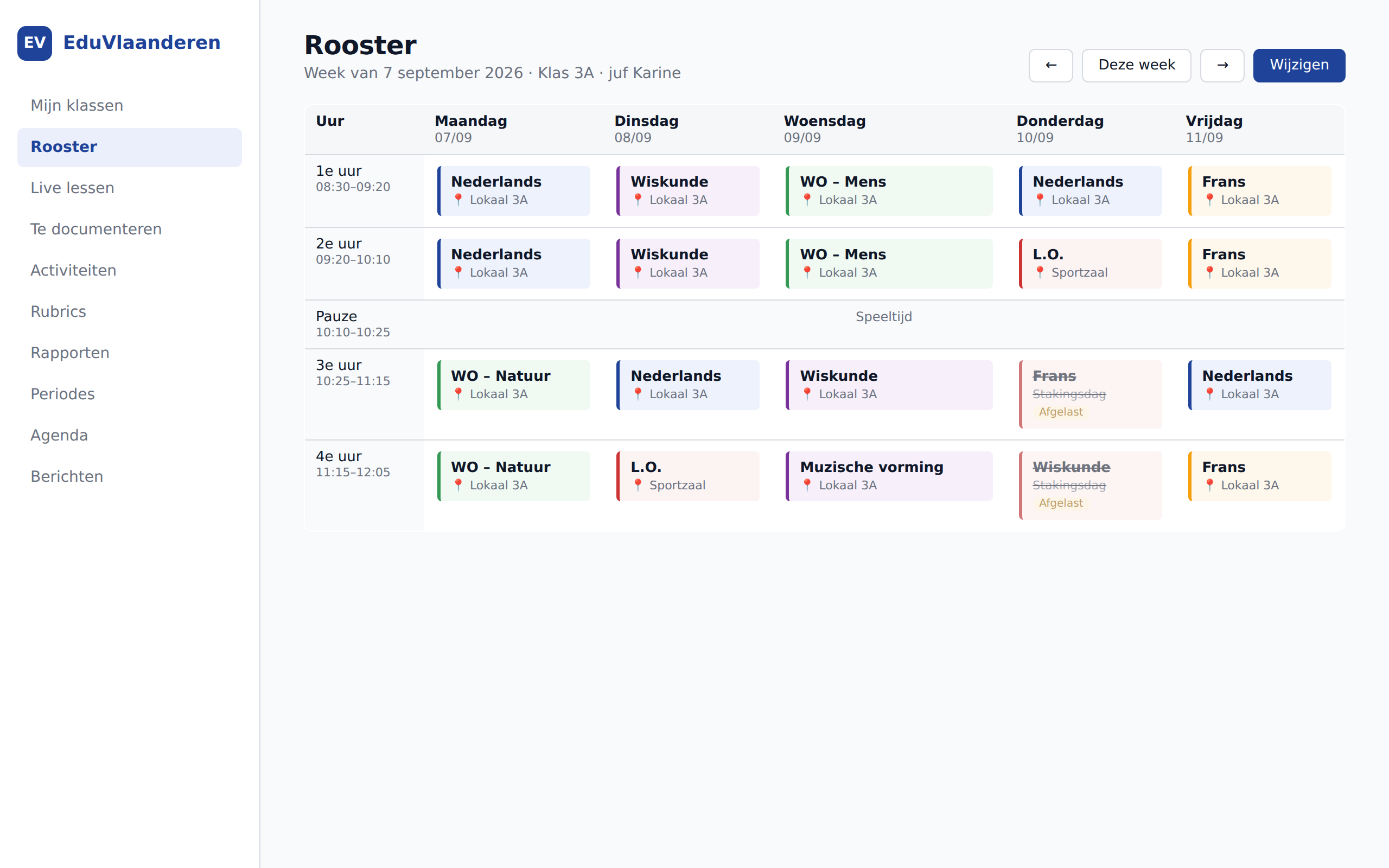
Rooms, teachers, classes, absences. Parents and students see changes immediately on their phone. PDF export for staff-room boards.
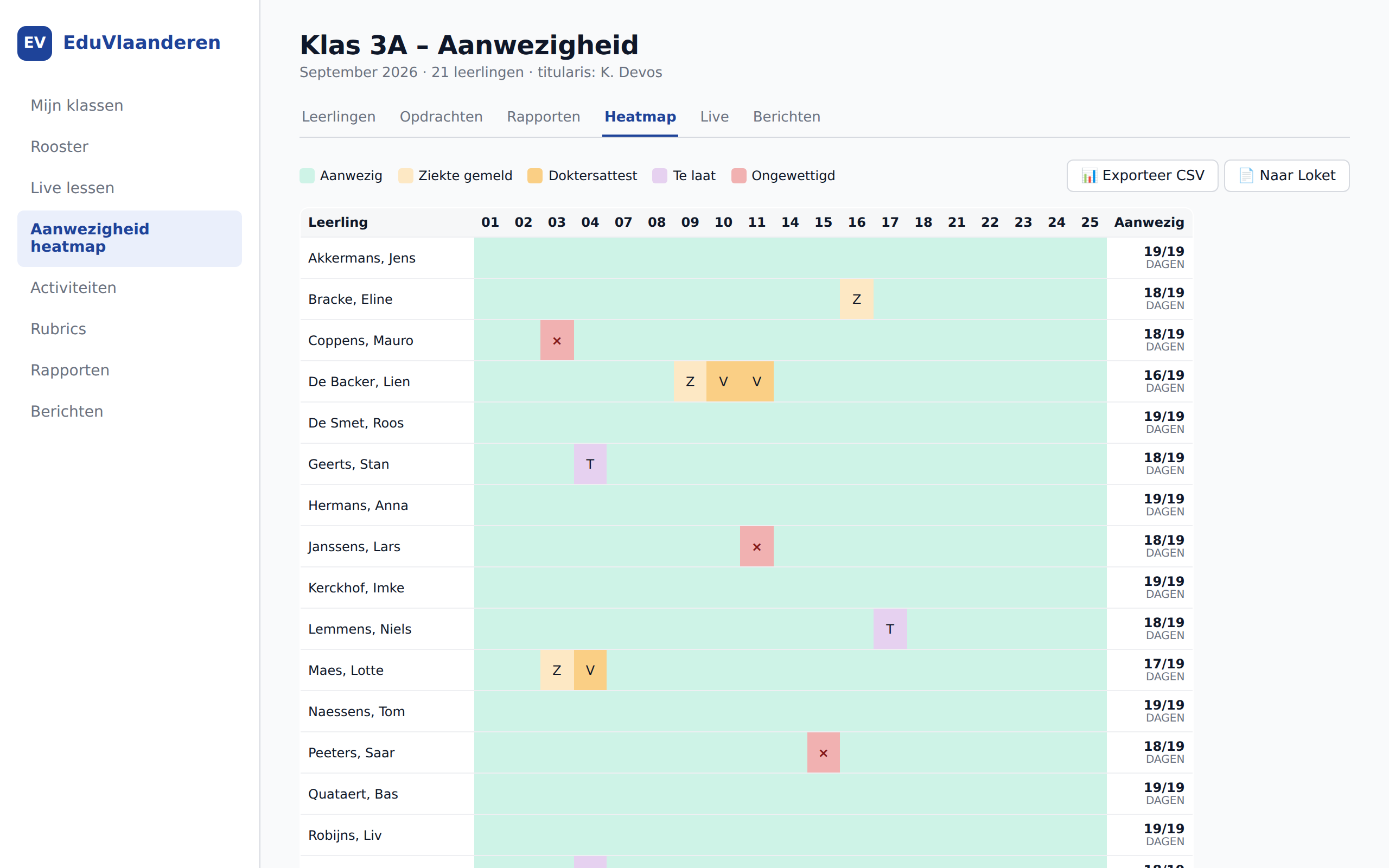
Half-day granularity, doctor's note workflow and controlled administrative exports. Regional connectors are enabled only after their format and credentials are validated.
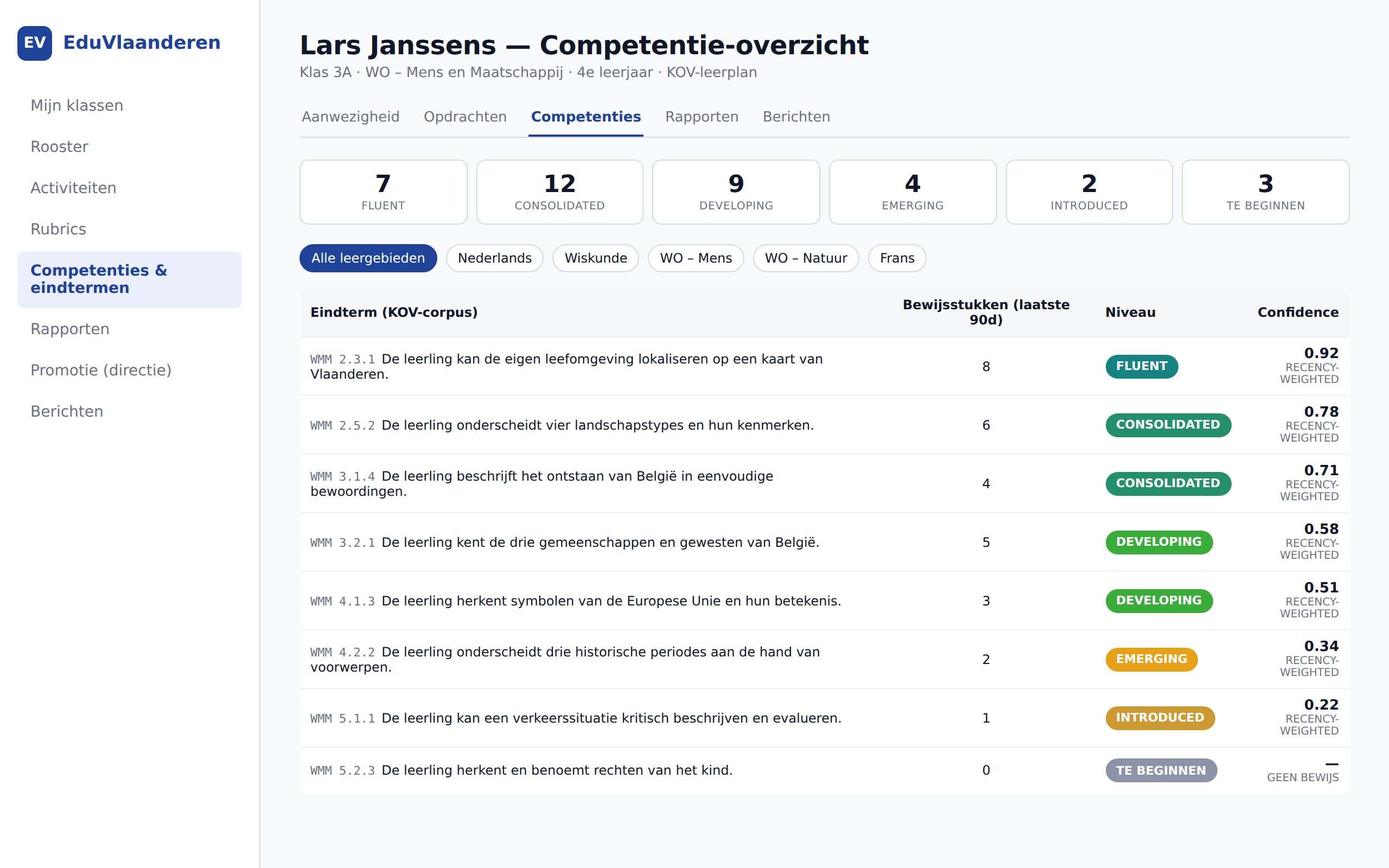
Assignments and assessments link to the school's selected curriculum framework. Flemish frameworks are available; additional regional packs are activated after validation with pilot schools.
Six levels from "to begin" to "fluent". Recency-weighted from the last evidence points — a measurable basis for reports.
Period-by-period generation, linked evidence and optional AI sentence suggestions. The teacher approves, edits or rejects.
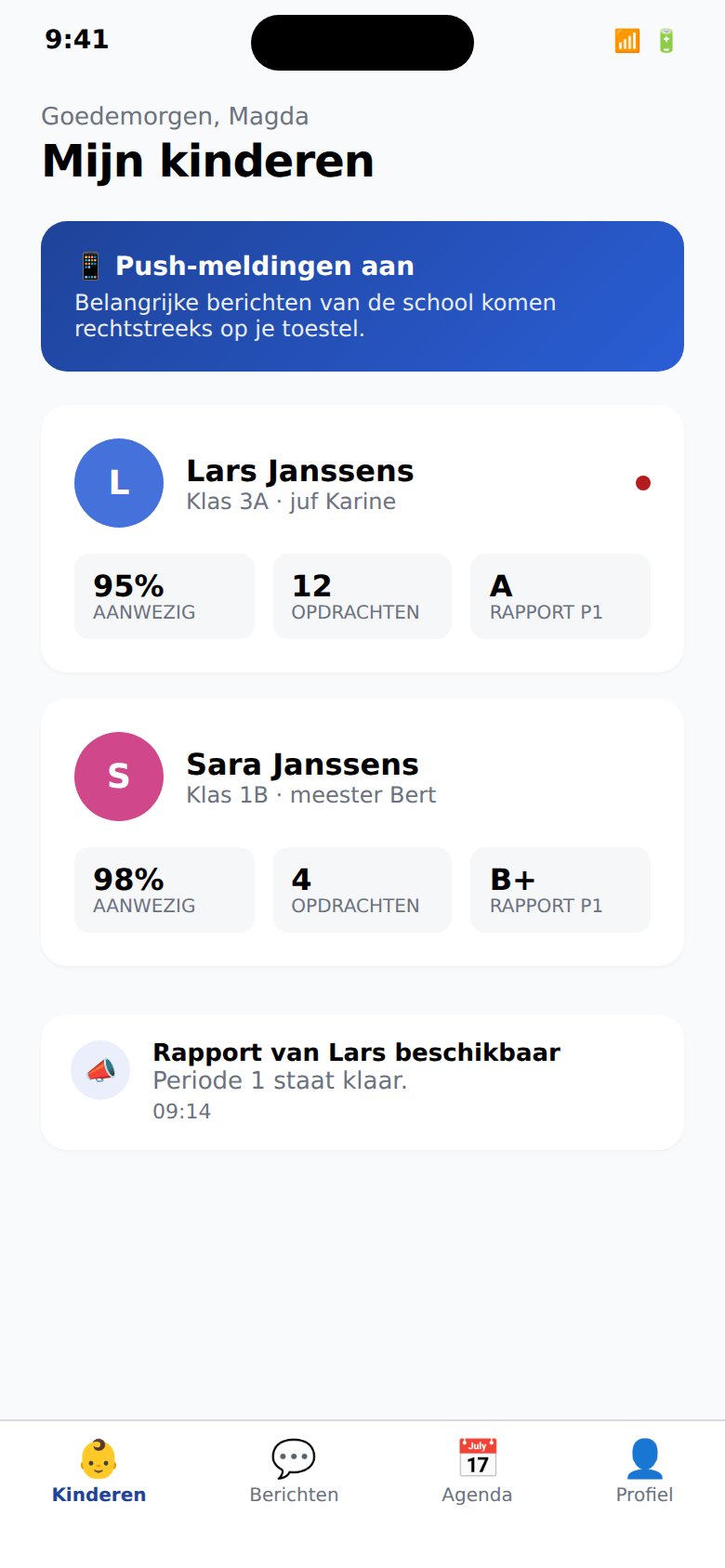
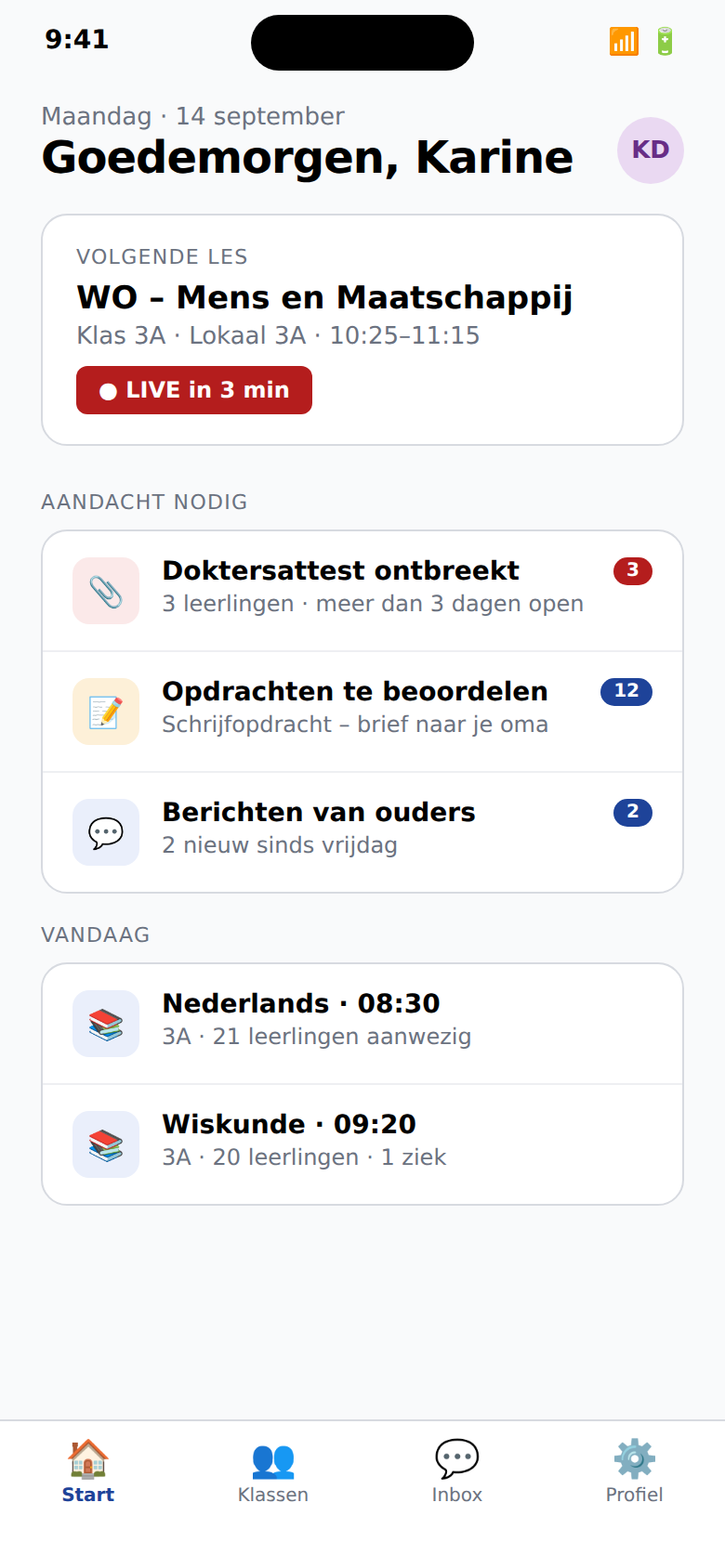
Parents, teachers and students receive a role-specific mobile experience alongside the web portal. Apps are enabled only after their critical workflows pass production validation.
Work-hours policy, urgency budget, quiet hours, automatic translation into 8 languages. Messages people actually read.
End-of-year run that promotes each class to the next. Class-attendance heatmap for pedagogical follow-up.
One agenda for lessons, deadlines, tests, trips and changes. Students see today while teachers plan ahead.
Enter assessments, retain feedback, apply rubrics and route reports through homeroom or leadership review.
Schools publish slots, parents book per child and teachers confirm or move a meeting without losing context.
Request a sports hall, laptop cart or studio. Availability, approval and cancellation stay visible to the team.
Questions, certificates and school forms become trackable conversations instead of messages in a shared inbox.
Learning material, school news, agreements and internal documents get a clear home with role-based access.
A mobile student card with verifiable QR, plus parent consent for media, trips and data sharing.
Track enrolments, school invoices, payments and the move into a new school year from one leadership flow.
Connects to your school environment
Learovia integrates where the flow can be verified. Every connector has an honest status, an export path and school-level logging.
Students, classes and school-year structures through controlled import/export and shadow comparison.
Repeatable data transfer with validation report, error list and rollback manifest.
Parallel import and export for schools retaining their administration package during transition.
SSO through verified OIDC identities, exact redirect allowlists and explicit school invitations.
Assistant features with school budgets, minimal prompts, human approval and provider/model audit.
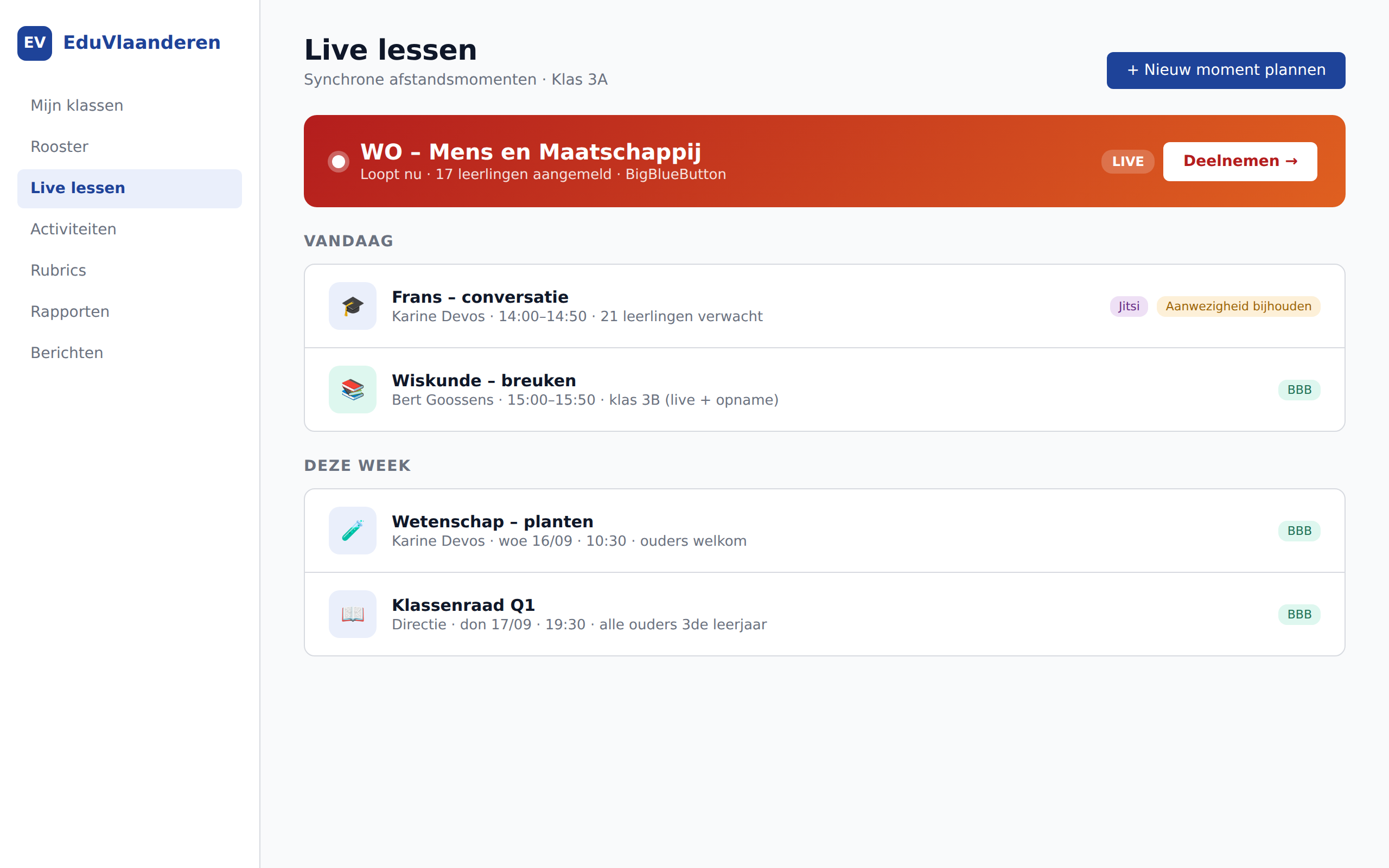
Live lessons from the familiar school context, activated with the school's chosen video service.
Calendar subscriptions for personal, class and school calendars using the common calendar standard.
Cloud SQL, GCS, Redis and stateless services in a European GCP region with separate runtime roles.
Submission, validation and reconciliation activate only after provider credentials and a successful parallel run.
Login options remain hidden until contracts, certificates and web/mobile callbacks pass end to end.
What it looks like
No wireframes, no placeholders. These are screens from the actual web and mobile experience schools use.
Scattered notifications become actionable signals. Quiet hours, digests, workload and human AI review sit together.
Course spaces, assessments, grades and student follow-up remain one recognisable teacher workflow.
Available, booked and confirmed appointments without spreadsheets or email ping-pong.
Leadership and administration follow enrolment, processing, balances and payments in one cockpit.
A verifiable QR card for library, lunch pass, bus and school restaurant, without sensitive data in the code.
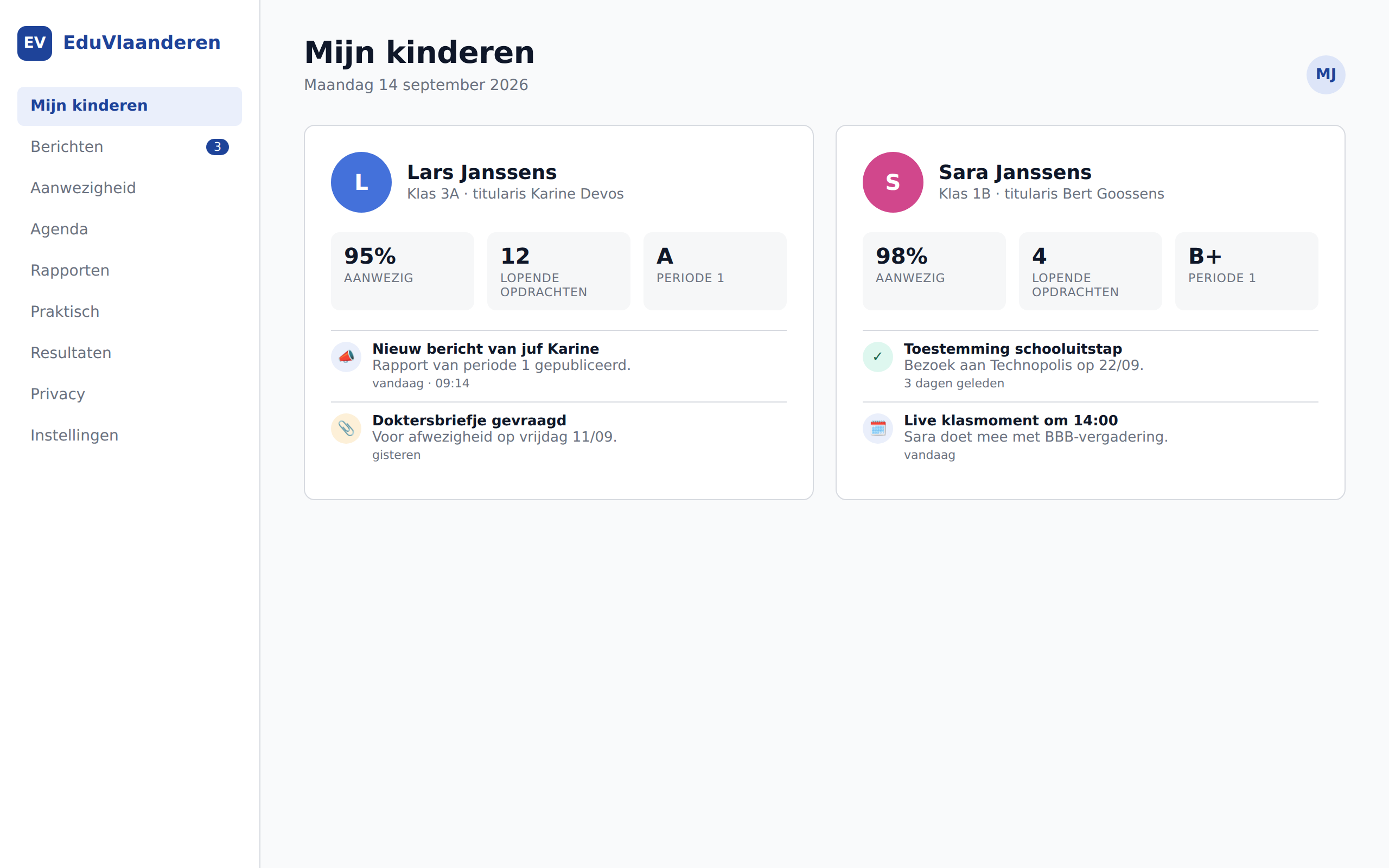
Messages, absences and day-to-day follow-up on mobile, without noise.
A fast mobile entry point for attendance, messaging and today's class work.
Why Learovia
A school platform should do more than look modern. It should reduce admin, improve parent communication and be simpler to roll out for the whole team.
Scheduling, attendance, reports and communication live together. Teams spend less time re-entering data, switching modules and hunting for context.
Parents see only what matters to them, in a clear per-child flow. That reduces overload and increases the chance that important messages are actually read.
Pilots can start from a recognisable web experience and mobile apps that match the real work of teachers, administration and parent follow-up.
Schools get a modern platform without locking themselves in for years. Pricing stays understandable and data export remains available if priorities change.
For schools that do not fit one standard template
Every school works differently. Learovia combines regional education workflows with support for newcomer language learning, alternative pedagogies, students with care needs and a real internal workspace for the school team.
Broad base care, increased care, extended care. Student dossier with confidentiality levels (team / care team / CLB only). Federation with CLB via explicit shares. Crisis flows built in for the care coordinator.
View the module →Intake flow with home language and prior education. CEFR progression across 4 skills (listening/speaking/reading/writing, A0 → B2). Decretal transition-readiness check (12 months + minimum A2). Parent communication automatically translated to home language.
View the module →One toggle in the director settings. Narrative reports instead of grades (Freinet/Steiner/Jenaplan). Task letter flow for Dalton. Period education for Steiner. Stamgroep for Jenaplan. Hybrid with regular is also possible.
View the module →Refusal model for students: asks Socratic questions, escalates after 3 misuse attempts to the teacher. Safety layer (self-harm/abuse) escalates directly to care coordinator. No Studius for kindergarten — pre-literate age.
View the module →Report phrases, eindterm tagging, class issue analysis (attendance+competency+activities), parent thread summary, differentiation suggestions, lesson plan draft. Source-grounded: every suggestion shows the data the AI used. The teacher always decides.
View the module →Internal workspace for the team: documents, meetings with agenda + minutes, ACL per person or per role, calendar visible to all staff by default. Flat structure, no folder spaghetti, search-first.
View the module →OpenDyslexic toggle, reading ruler, Pomodoro focus timer (ADHD), color overlays (Irlen), visual schedule (ASD), chunked text for cognitive load. Not "accessibility is opt-in afterthought" — built into every page.
View the module →Discovery → shadow mode (running parallel) → pilot per class → module switchover → decommission. At any time 1-click export to Smartschool bulk import format. No vendor lock-in, not with us, not with Smartschool.
View the module →How it works
Not a marketing summary — the actual mechanics, the pedagogical reasoning, and what a teacher or care coordinator sees on screen. What's described here is in the code you receive.
The Flemish care continuum is not marketing speak — it is established in education law. Learovia follows the continuum strictly: broad base care (tier 1) is implicit, increased care (tier 2) and extended care (tier 3) have a structured dossier with actions, follow-ups, and CLB federation.
What breaks today
In Smartschool, "care" is spread across notes, messages, and Word files on the shared drive. Nobody knows what information whom may see. CLB workers receive emails with PDF attachments — a GDPR nightmare.
How Learovia fixes it
One dossier per student, with explicit confidentiality levels: team-visible, care-team-visible, or CLB-only (federated, only via explicit share). Actions are recorded chronologically, with type (observation, intervention, meeting, referral, note) and optional follow-up date.
The care continuum requires gradation of interventions and of privacy. A class teacher must be able to see a student gets extra support, but not necessarily the family-context details that the CLB worker discusses. By storing confidentiality as a first-class attribute in each dossier, we avoid the "all or nothing" culture that pushes schools toward informal email.
OKAN students (Newcomer Language Learners) follow a separate track — minimum 1 year, with explicit transition-readiness criteria. Learovia follows the decretal rules exactly and gives the OKAN teacher a working tool instead of a spreadsheet.
What breaks today
Smartschool has no OKAN module. Schools track CEFR levels in Excel, transition moments in a Word document, and parent communication happens via Google Translate copy-paste by the teacher.
How Learovia fixes it
One intake flow records home language, country of origin, prior education, and literacy. Progress is recorded periodically across four skills (listening / speaking / reading / writing), CEFR-aligned (A0 → B2). A readiness engine determines if the student is ready for transition per decretal rules (≥ 12 months + minimum A2 across all 4).
CEFR (European Reference Framework) is not edu-jargon — it is the framework the OKAN teacher uses in training and that connects to the parents' integration track. By tracking 4 skills separately we get a fairer picture: a student can present fluently orally (B1) while writing still sits at A2. The readiness rule "all 4 ≥ A2" prevents premature transition.
Freinet, Dalton, Steiner and Jenaplan are not edge cases — together they represent hundreds of Flemish schools that Smartschool consistently treats as deviation. Learovia has a built-in mode per method, with correct out-of-the-box defaults.
What breaks today
A Freinet school wanting narrative reports in Smartschool must rewrite templates manually every term. A Dalton school wanting task letters imports Excel files. A Steiner school is forced to use grades it pedagogically rejects.
How Learovia fixes it
One dropdown in director settings enables the method, with preset defaults overriding most pedagogical choices: narrative report for Freinet/Steiner/Jenaplan, task letter for Dalton, period-education blocks for Steiner. Feature flags remain adjustable — a hybrid school combines.
A platform treating method schools as "regular school with cosmetic changes" misunderstands the pedagogical project. A narrative report is not "the same report without grades" — it is a fundamentally different evaluation philosophy where the growth of the child matters more than position on a scale. By bringing method-config to the heart of report generation, Freinet and Steiner teachers can truly follow their pedagogy.
Turning ChatGPT loose on homework teaches students nothing but copy-paste. Studius is built on the opposite principle: refusal is the core competency. The AI asks Socratic questions, suggests strategies, references earlier material — but never gives the final answer.
What breaks today
Students using ChatGPT to solve math exercises pass exams until they sit in a test room. Teachers cannot detect this, and the education system has no alternative that respects their pedagogical role.
How Learovia fixes it
Studius uses only the AI service a school explicitly enables and does not provide ready-made final answers. It offers intermediate steps and Socratic questions; repeated misuse or a safety risk becomes visible to the teacher or care coordinator.
A good teacher rarely answers a student question directly — the first reaction is almost always a counter-question: what have you tried? what do you know about this? which step would you take first? Studius is not Socrates cosplay; it is an AI explicitly trained to imitate that teacher reflex. The difference with ChatGPT is fundamental: ChatGPT optimises for "helpfulness", Studius for "learning yield".
Lerarius supports concrete teacher work: report writing, lesson preparation, differentiation, parent conversations and class follow-up. Every suggestion shows which school information was used.
What breaks today
A blank AI chat makes teachers explain the full context every time. The result can sound convincing without making clear what it is based on.
How Learovia fixes it
The teacher chooses a familiar task and the relevant class, student or assignment. Lerarius drafts from selected school information and keeps the sources visible. It never publishes automatically.
A teacher writing a report phrase about a student is professionally accountable for what it says. A report phrase from an AI without source citation cannot be professionally endorsed. By linking every Lerarius response to its source data, the teacher remains the final authority — the AI does only the typing work, not the judgement.
Every school team needs a workspace that is neither the messaging module nor Google Drive. Schoolwerking is that — flat structure with categories instead of folders, ACL per person or per role, and search-first navigation.
What breaks today
Intradesk is a disappointing UX from 2008 with nested folders no one can navigate. The alternative — Google Drive — splits the school into two data worlds, with privacy implications and no integration with the rest of the platform.
How Learovia fixes it
A flat list of documents + meetings, categorised (policy / procedure / minutes / note / calendar / other), searchable in title and content. ACL is per-document or per-meeting, with principal = person or role ("all teachers"). Calendar category automatically readable for all staff. Director sees everything.
Folder structures come from a world where storage was expensive and search was slow. A school team has neither — storage is free and search is instant. A flat structure with categories + tags + full-text search finds a document faster than anyone can click through a folder hierarchy. Bonus: new staff don't need to learn folder conventions.
Universal Design for Learning is not "an accessibility button in the corner" — it is a design principle saying every student deserves an interface that works for them. Learovia has a component library with 7 aids, available on every page.
What breaks today
Accessibility in Flemish edtech usually means: a dark mode and larger fonts. For students with dyslexia, ADHD, ASD, dyscalculia or dyspraxia, that's insufficient. Aids are often sold as separate apps that don't integrate with the platform.
How Learovia fixes it
An accessibility toolbar (♿ button bottom-left) opens a panel with 7 aids. Students themselves choose what's on — preferences persist, including in the mobile app.
Dyslexia, ADHD and ASD have contradictory needs. What helps a student with dyslexia (OpenDyslexic font, colour overlay) can distract a student with ADHD. What gives an ASD student structure (visual schedule, repeating routine) can cognitively overload a student with dyscalculia. The answer is not an "accessibility mode" but individual control — each student configures what works for them.
AI assistant for teachers
A school can activate OpenAI for assistant features. We minimise transferred data, record provider and model usage, and keep every final decision with the teacher or school.
Optional AI suggests report sentences from selected learning evidence. The school controls activation and budget; the teacher approves, edits or rejects every suggestion.
Parents receive messages in Dutch plus their own language: FR, EN, DE, AR, TR, PL, RO, UK. Translation via self-hosted LibreTranslate with tenant-scoped cache.
You describe the assignment; the assistant suggests outcomes from the school's regional curriculum framework. The teacher confirms the link.
Four pure-statistics detectors: weekday residual, 10-day cluster, two-proportion z-test trend, consecutive unjustified. No LLM — auditable and explainable.


Mobile
Not one app with three tabs. Three separate apps, each optimised for its user. iOS and Android, built with React Native (Expo).
Pricing
No hidden fees, no annual contracts with auto-renewal. Monthly invoicing, cancellable per trimester.
per student per year — first school year at half price
per student per year — from year 2
for umbrellas >5 schools or >1500 students
Concrete example: a primary school with 350 students pays €1,575 in the first school year and €3,150 per year from year two, excluding VAT where applicable.
One pilot school per region, first school year at half price. We show the platform with your real school context — your classes, your periods, your learning outcomes.
Request a demo